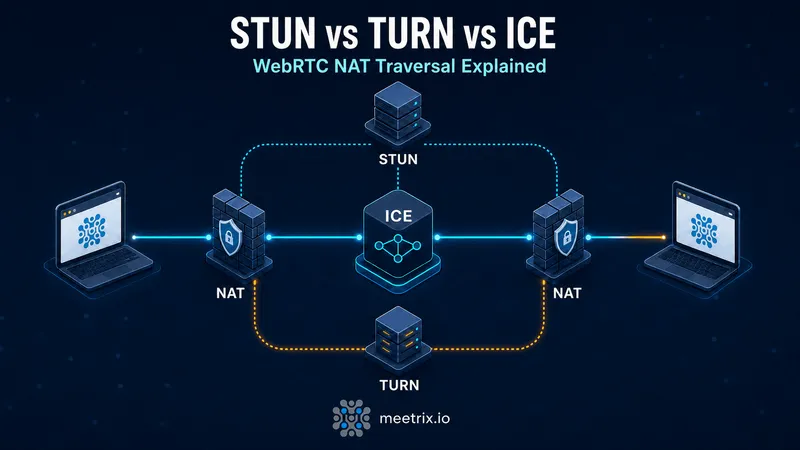
Every WebRTC "connection failed" issue traces back to the same three acronyms: STUN, TURN, and ICE. They're not competing options you pick between, they're three different jobs in the same handshake, and most of the confusion comes from people trying to compare them like they're interchangeable.
Here's the short version: ICE is the process, STUN is one tool it uses to try a direct connection, and TURN is the fallback when that direct connection isn't possible. Get this straight and half the "why won't my call connect" debugging sessions get a lot shorter.
Quick answer
Jump to a section
Why NAT breaks direct WebRTC connections
WebRTC wants to send audio and video directly between two browsers, peer to peer, with no server in the media path. That's the whole appeal: lower latency, less server cost, no single choke point. The problem is that almost nobody has a public IP address on their laptop anymore. You're behind a router doing Network Address Translation (NAT), and so is the person you're calling.
NAT rewrites your private address (something like 192.168.1.42) into a public one as traffic leaves your network, and it has to remember that mapping to route replies back. That's fine for you making outbound requests to a server. It's a genuine problem for a peer who wants to send you traffic first, because they have no idea what your public address even is, let alone how to get through the mapping to reach you.
There are a few flavors of NAT, and they don't all behave the same:
- Full cone NAT: once you've sent a packet out from a given internal port, anyone can send packets back to the mapped external port. The easiest case, and STUN handles it without trouble.
- Restricted cone NAT: replies are only allowed from the same external IP you sent to.
- Port restricted cone NAT: same as above, but restricted to the exact IP and port.
- Symmetric NAT: the router assigns a different external port for every destination you talk to. This is the one that actually breaks things. STUN can't help here, because the mapping it discovers for talking to the STUN server won't be the same mapping used for the peer.
Symmetric NAT shows up more than you'd expect: some corporate firewalls, some mobile carrier networks, and a handful of consumer routers all do it. That's the whole reason TURN exists.
What STUN actually does
STUN stands for Session Traversal Utilities for NAT, defined in RFC 5389. Its job is narrow and cheap: a client sends a request to a public STUN server, and the server replies with the public IP and port it saw the request arrive from. That's it. No relaying, no ongoing connection, just "here's how the outside world sees you."
Once both peers know their own public-facing address (called a server reflexive candidate), they can exchange that information through the signaling channel and try connecting directly. On full cone or restricted cone NAT, this usually works. The two browsers punch a hole through their respective routers and media flows peer to peer, exactly like WebRTC intended.
The catch: STUN only discovers the address, it doesn't guarantee the connection will succeed. On symmetric NAT, the address STUN reports is useless for the peer connection, because the router will assign a fresh port for that specific peer-to-peer attempt anyway. STUN did its job correctly and the call still can't connect. That's not a STUN failure, it's a NAT topology problem STUN was never designed to solve.
Google runs a widely used public STUN server (stun.l.google.com:19302), and it's fine for prototyping. Don't build a production app on it: no uptime guarantee, no support contract, and it only solves half the problem anyway.
What TURN actually does
TURN stands for Traversal Using Relays around NAT, originally RFC 5766 and later folded into RFC 8656. Where STUN just answers a question, TURN does actual work: it relays every media packet between two peers who can't reach each other directly.
The client allocates a relay address on the TURN server, tells its peer about that address as a relay candidate, and both sides send their media to the relay instead of to each other. The TURN server forwards packets in both directions. Neither peer ever talks to the other's real network path, they both just talk to the relay.
This fixes the symmetric NAT problem completely, because now both sides only need to reach one predictable, public server, not each other. The tradeoff is real, though: every byte of every call now passes through that relay server. Bandwidth costs money, the relay is now a single point that can bottleneck under load, and latency goes up slightly since packets take a longer path. TURN is the fallback, not the default, precisely because of that cost.
In the wild, this is where coturn comes in. It's the open source TURN/STUN server almost everyone ends up running, whether that's a hobby project or a video conferencing platform serving thousands of calls. If you've searched for "stun and turn server difference" because a call keeps failing on a specific network, coturn handling the TURN relay is very likely the missing piece.
What ICE actually does
ICE, Interactive Connectivity Establishment (RFC 8445), is the layer that ties STUN and TURN together into something that actually works end to end. ICE itself doesn't discover addresses or relay media, it's the negotiation process that gathers every possible way to reach a peer, tests them, and picks the best one that succeeds.
When a WebRTC peer connection starts, each side gathers three kinds of ICE candidates:
- Host candidates: your actual local network addresses, useful when both peers happen to be on the same LAN.
- Server reflexive candidates: your public IP and port, discovered via STUN.
- Relay candidates: an address on a TURN server, allocated as the fallback.
Both peers exchange their full candidate list through the signaling server (which, notably, is not part of WebRTC itself, that's on you to build, usually with WebSocket, a SIP server, or whatever else you're already using). ICE then tries pairing candidates, from most to least preferred, checking each pair for actual connectivity, and locks in the first pair that works. Host-to-host is preferred (fastest, cheapest), then server reflexive, then relay as the last resort.
Modern implementations use Trickle ICE, sending candidates as they're discovered rather than waiting to gather everything first. That's why the Trickle ICE test tool is genuinely useful for debugging: paste in your STUN and TURN server details and watch candidates arrive live, including whether a relay candidate showed up at all.
STUN vs TURN vs ICE at a glance
| Aspect | STUN | TURN | ICE |
|---|---|---|---|
| What it actually does | Tells a client its public IP and port, as seen from outside the NAT | Relays media between two peers when a direct connection isn't possible | Gathers every candidate, tests pairs, picks the one that connects |
| Defined in | RFC 5389 | RFC 5766 / RFC 8656 | RFC 8445 |
| Touches your media? | No, discovery only | Yes, every packet passes through it | No, it's the negotiation logic, not a media path |
| When it's actually needed | Full cone and restricted cone NAT, most home routers | Symmetric NAT, locked-down corporate firewalls, some carrier networks | Every single WebRTC connection, always |
| Bandwidth cost to you | None | Full, you pay for relay bandwidth on every relayed call | None directly |
| Typical port | 3478 (UDP/TCP) | 3478, plus 5349 for TURNS over TLS | Not applicable, it's a process, not a server |
Which one do you actually need
All three, if you're shipping to real users. This isn't really a "which do I pick" decision the way "STUN vs TURN" phrasing suggests, it reads that way because people usually search it after a call fails and they're trying to figure out which piece is missing.
ICE is not optional, it's built into every WebRTC RTCPeerConnection and runs regardless of what servers you configure. STUN costs you nothing to add and unblocks a solid chunk of ordinary home and office connections, so there's no real reason to skip it. TURN is the one people try to avoid because it costs bandwidth, but skip it and you're quietly excluding every user on symmetric NAT or a restrictive firewall. Those calls won't error out with something obvious either, they'll just hang on "connecting" forever, which is a miserable thing to debug without ICE candidate logs in front of you.
A practical rule: configure both a STUN and a TURN server in your iceServers list from day one, even in development. Testing only on your home WiFi, where cone NAT is common, hides exactly the failure mode you'll hear about from users the moment you launch.
const configuration = {
  iceServers: [
    { urls: "stun:your-turn-server.example.com:3478" },
    {
      urls: "turn:your-turn-server.example.com:3478",
      username: "webrtcuser",
      credential: "your-turn-secret",
    },
    {
      urls: "turns:your-turn-server.example.com:5349",
      username: "webrtcuser",
      credential: "your-turn-secret",
    },
  ],
};

const pc = new RTCPeerConnection(configuration);
Running your own TURN server
coturn is the open source implementation almost everyone reaches for, it does STUN and TURN in one binary and handles the authentication, relay allocation, and TLS termination you need for a production deployment. Running it yourself instead of leaning on a third-party relay service means your media traffic never leaves infrastructure you control, which matters if you're working under GDPR or similar data residency requirements.
We maintain a pre-configured coturn AMI so you're not hand-rolling the CloudFormation template, the TLS certificates, and the systemd units yourself. The AWS developer guide walks through launching it, and the GCP guide covers the same setup if that's your cloud. If you're specifically wiring TURN into a Jitsi Meet deployment, the Jitsi TURN server guide covers the config differences that trip people up there.
Once it's running, the fastest way to confirm it's actually working is the Trickle ICE tool linked above: plug in your TURN URI, username, and credential, hit gather candidates, and check for a relay candidate in the results. No relay candidate means your TURN config is wrong, not that TURN itself doesn't work, that distinction saves a lot of wasted debugging time.
Frequently Asked Questions
What is the difference between a STUN server and a TURN server?
A STUN server just tells a device its public IP and port so two peers can try to connect directly. A TURN server sits in the middle and relays every packet when a direct connection isn't possible. STUN is a quick lookup; TURN is a full-time relay that costs bandwidth for as long as the call runs.
What is a TURN server used for?
A TURN server relays audio, video, and data between two WebRTC peers when NAT or firewall rules block a direct peer-to-peer path. This is common with symmetric NAT, strict corporate firewalls, and some mobile carrier networks. Without TURN, those calls simply fail to connect.
What are ICE candidates in WebRTC?
ICE candidates are the possible network addresses a WebRTC client offers for connecting to a peer: its local address (host), its public address discovered via STUN (server reflexive), and a relay address on a TURN server (relay). ICE tests pairs of these and picks the one that actually works.
Do I need both STUN and TURN for WebRTC?
For a production app, yes. STUN alone gets most calls connected on ordinary home and office networks, but it does nothing for symmetric NAT or locked-down firewalls. Skip TURN and a real slice of your users, often the ones on corporate or mobile networks, won't be able to connect at all.
Why does my WebRTC call work on WiFi but fail on mobile data or a corporate network?
WiFi routers usually do cone NAT, which STUN can traverse fine. Mobile carriers and corporate firewalls more often use symmetric NAT or block UDP outright, so the call has nothing to fall back on except a TURN relay. If TURN isn't configured, ICE runs out of candidates and the connection never completes.
Can I use Google's public STUN server in production?
It works for testing, but it's not meant for production traffic: no SLA, no support, and it can rate-limit or drop under load. It also only solves the STUN half of the problem, you still need your own TURN relay for the calls STUN can't fix. Most teams run their own coturn instance for both.
What ports does a TURN server like coturn use?
Coturn listens on 3478 for plain STUN/TURN over UDP and TCP, and 5349 for TURNS (TLS-encrypted TURN). Relay traffic itself uses a configurable UDP port range. Many deployments also open 443 for TURNS, since that's the one port almost no firewall blocks.
Deploy Your Own TURN/STUN Server
Launch a pre-configured coturn server on AWS in minutes and stop losing calls to symmetric NAT and corporate firewalls.
Get Coturn on AWS Marketplace